Core products
Virtual PBXCall center softwareCall automationCall tracking
Platform and capabilities
VoIP telephony
Capital Talker softphoneSIP trunkCRM and API integrations
Solutions
Customer support and BPOMarketing agencieseCommerce and retailTourism and bookingAuto dealers and service centersHoReCa
Company
PricingResourcesSupport
Home/Products/
Cloud Virtual Phone System for Companies

Cloud virtual phone system for companies in Romania

Your company's phone system, in the cloud, with no device to buy. The team answers from the browser, the mobile app, a softphone or an IP phone, on the business number, with an IVR voice menu, routing by department and reports on every call. A service for companies and sole traders (PFA), with a contract and an invoice.

From 60 EUR/month, or48 EUR/month billed annually.
★★★★★5.0 on Google · GDPR compliant · Set up in a few days

Request a call

A consultant will call you back as soon as possible.

Selected plan
Custom setup for your businessReal call and flow simulationNo hidden costs
GDPR compliant
Thank you! We'll call you back. A CapitalPBX consultant will contact you as soon as possible.
Oops! Something went wrong while submitting the form.
Overview

Answer calls anywhere

Web, mobile app or softphone. No dedicated hardware, no complex installations.

  • Business telephony with no hardware
  • Scalable for growing teams
  • Keep your existing numbers, we handle the porting
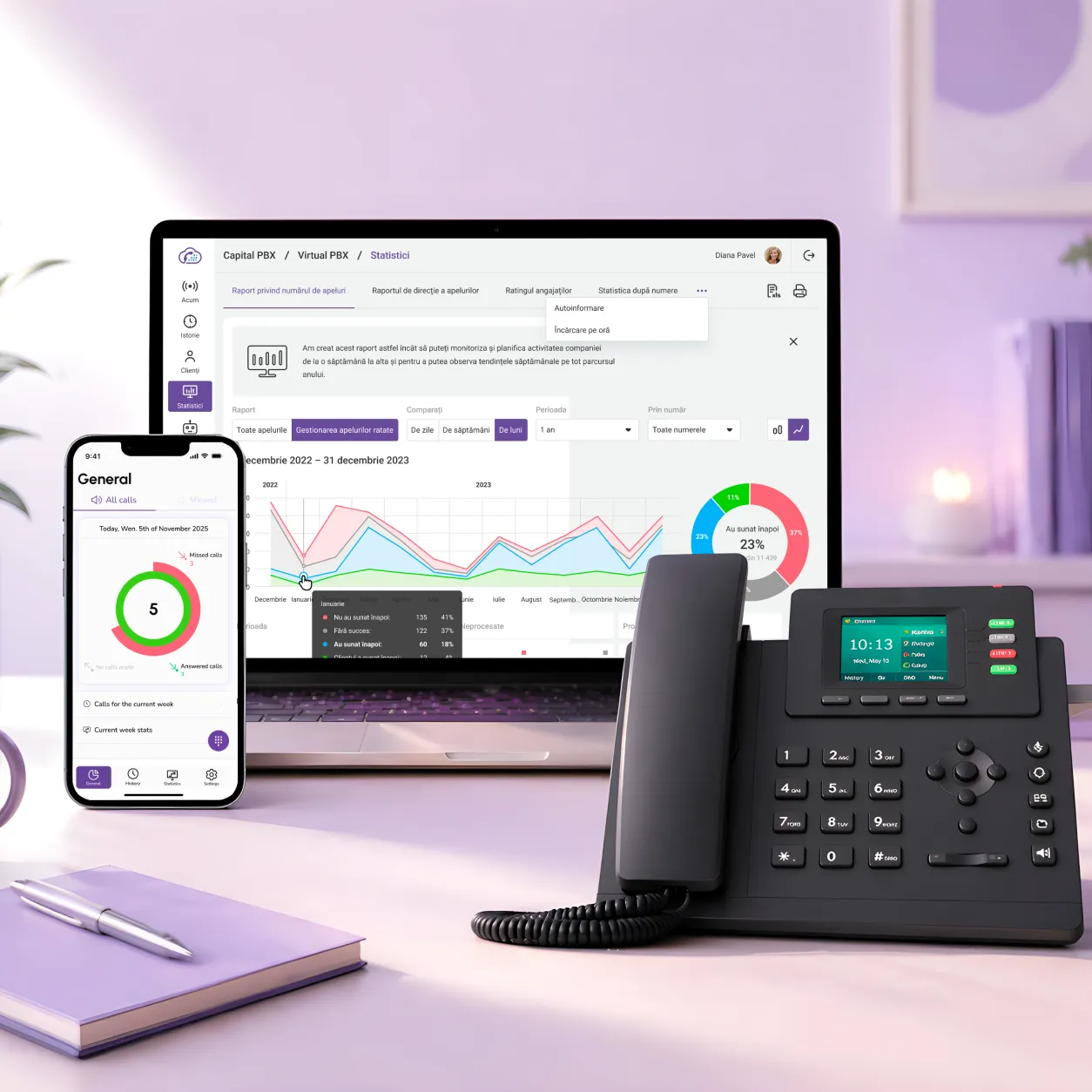
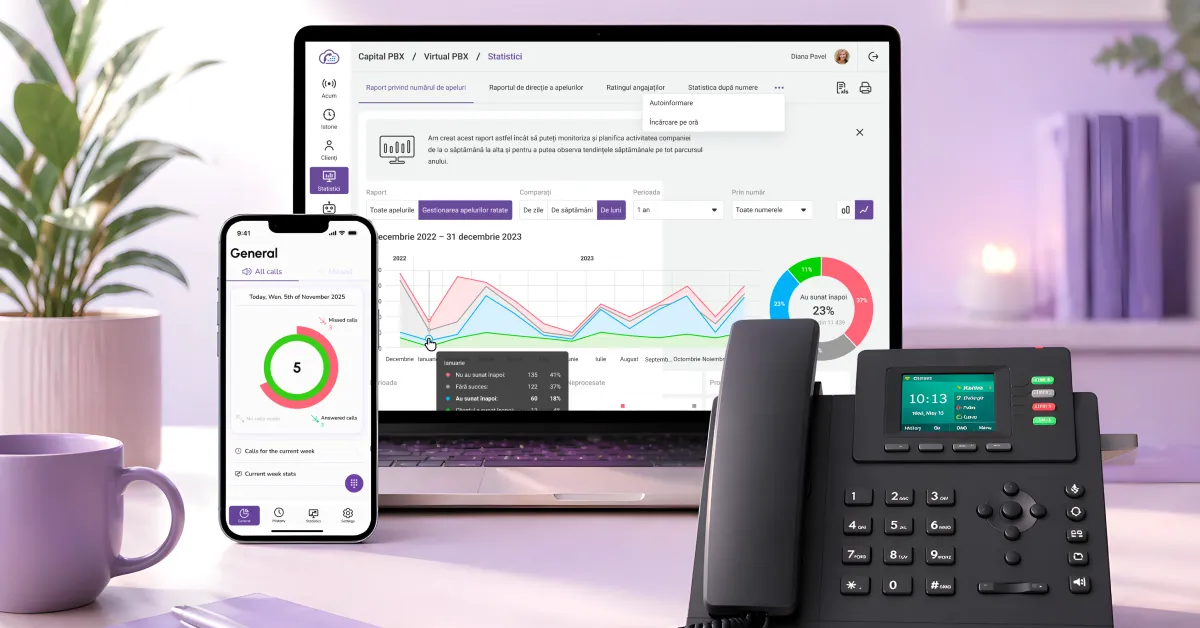
CapitalPBX call reports dashboard on a laptop, the mobile app on a smartphone and an IP desk phone
Features

A complete virtual phone system, in a single platform

Routing menus and IVR

Set up smart call flows and menus in a few minutes.

Capital Talker (softphone)

Take calls from any device, with no dedicated hardware.

CRM and API integrations

Connect CRMs and ticketing systems to your calls.

Performance analysis

Call volume, response time and performance, in real time.

Download the CapitalPBX mobile apps
CapitalPBX – Download on the App StoreCapitalPBX – Get it on Google Play
Virtual phone system

What is a virtual phone system?

A virtual phone system is a cloud PBX that manages a company's calls without physical equipment. With CapitalPBX you set up IVR, routing, numbers, users, recordings and reports directly online, and your team answers from the browser, mobile app, softphone or IP phone, from anywhere.

Who a virtual phone system is for

If customers call your company (orders, appointments, support or complaints) and you want every call to reach the right person without getting lost, a virtual phone system solves exactly that. It works just as well for a company of two or three people as for a team of twenty: you start from 60 EUR/month (48 EUR/month billed annually), and add users as the team grows.

What kind of companies it makes sense for
  • Medical and dental practices: calls for appointments are answered even while you are with a patient in the practice, and anyone who cannot get through receives a callback.
  • Online shops and retail: orders, deliveries and returns come in on one company number, not on employees' personal phones.
  • Marketing agencies, car dealers and repair shops: the call goes straight to the right colleague, by rules you define.
  • Hotels, restaurants and travel agencies: calls received after hours go to the voice menu, and you follow up with a callback.
  • Customer support and BPO teams: call queues, automatic distribution and reports by agent, queue and interval.
What CapitalPBX is not

CapitalPBX is a service for companies and sole traders (PFA), with a contract and an invoice issued to the business. We do not sell personal phone plans, we do not install landlines at home and we do not offer numbers for private calls. If you just want to call someone, rather than answer your own customers' calls, we are not the right choice; we would rather tell you that now, not after you fill in the form.

We are not a call centre either, and we do not arrange jobs: we sell the software companies use to manage their calls. If you arrived here looking for an operator or call centre agent job, the form on this page will not help you; it goes to our sales team.

PBX Virtual CapitalPBX

Business numbers for your company

You keep the number your customers already know (we file and track the porting request for you) or you get a new one, local or national. Calls enter the voice menu and reach the right department: sales, support, administration. Every call stays in the history, the reports and the CRM, with no landlines and no physical system on site. Numbers are issued to the company and are intended for business use.

Missed calls

Reduce missed calls and answer every customer

Smart routing, call queues and automatic callback, so no important call goes unanswered, neither at peak hours nor after hours.

Routing and call queues

Calls are automatically distributed to the right agent, and at peak times they enter orderly queues, so they aren't lost.

Automatic callback

Missed calls get an automatic callback, so the customer is called back without waiting on the line.

Answer after hours too

Set up forwarding, messages and flows for calls received after hours, so no request goes unanswered.

Visibility into missed calls

See missed calls, response times and available agents in reports, so you can fix things in time.

Comparison

Physical phone systems vs. virtual phone systems

When you look for a phone system (analogue, digital or IP) you are really choosing between two different things: a piece of equipment you buy and keep on your premises, or a virtual phone system that runs in the cloud. The second gives you the same functions (an extension for every colleague, a voice menu, call routing) on a subscription, with no equipment to buy and no equipment room. CapitalPBX is the second kind: we sell it to companies in Romania, with a contract and an invoice issued to the company. We do not sell physical phone systems and we do not offer personal phone plans.

A physical phone system, on your premises
  • You buy the equipment once, then pay for installation, maintenance and, as a rule, every technician visit.
  • Capacity is set by what you bought: on analogue and digital systems, by the boards and ports installed; on IP systems, by licences and the server they run on.
  • To answer calls away from the office you need extra configuration: forwarding, VPN or remote extensions.
  • Updates, backups and end-of-life replacement remain your company's job.
A CapitalPBX virtual phone system, in the cloud
  • You pay a subscription: from 60 EUR/month, or 48 EUR/month billed annually; no equipment to buy.
  • You add users and numbers as the team grows, straight from the platform.
  • You answer calls from the browser, the mobile app, a softphone or an IP phone.
  • You configure numbers, the voice menu (IVR) and routing yourself, from the same platform, in minutes.

Already have a phone system on site? You do not have to throw it away.

If your company has already invested in an on-site phone system, you do not unplug it to work with us. You connect it to CapitalPBX with the external IP-PBX connector option, 20 EUR per month on top of the plan you choose. On the Lite and Business plans, CRM integration is a separate option at 20 EUR per month, while the Prime plan includes it. The connection details are on the SIP trunking page.

Your existing system stays where it is and keeps answering calls, while calls that pass through CapitalPBX get the cloud features: voice menu (IVR), call queues, call history and reports, all included in the base package. The connector makes sense if you want the two systems to work together. If you are not sure what equipment you have on site, tell us the make and model in the first 15-minute conversation and we will check together whether it can be connected.

Google reviews · 5.0 ★

What customers say about CapitalPBX

Real reviews, published on our Google profile.

L
Lia BasocDental clinic
★★★★★

We signed up with the telephony company Capital for our dental practice: welcome message, call recording. They react quickly, they helped us with the recordings, and the app is very convenient. I recommend them. (Translated from Romanian.)

✓ Verified Google review
N
Nikita DmitrieveCommerce, Bucharest
★★★★★

We use CapitalPBX for virtual PBX, call tracking and VoIP. The implementation went quickly and the team helped us from the start. We now have more control, and customers are handled more efficiently. (Translated from Romanian.)

✓ Verified Google review
P
Plugaru CosminCustomer support & BPO
★★★★★

We run a call centre business and take calls all day long. The solution has helped us organise our calls better during busy hours. Support is always available. I recommend it! (Translated from Romanian.)

✓ Verified Google review
Why CapitalPBX

Telecom technology, with local support in Romania

Not just software, but a team with over 20 years in telecom that joins you from setup to optimization.

20+years of telecom experience
5.0 ★real reviews on Google
a few daysfrom contract to the first call
GDPR · SOC 2data hosted in line with the EU
How to get started

From the first conversation to the first call, in a few days

A simple process, guided by a specialist, with no technical hassle.

01

A 15-minute conversation

You tell us how your team works and your call volume. No pressure.

02

Custom setup

We set up numbers, departments, IVR and the integrations with your CRM.

03

Activation in a few days

We migrate your setup and handle the porting request, keeping your numbers.

04

Continuous local support

We stay with you with support in Romanian and optimizations.

Explore the platform

The other CapitalPBX products

Four products that work together, in a single platform.

Frequently asked questions

Quick answers

What is Virtual PBX?
A virtual PBX is a cloud phone system that manages a company's calls without physical equipment. You set up IVR, routing, users, numbers, recordings and reports directly online.
How much does Virtual PBX cost?
Plans for Virtual PBX start from 48 EUR per month. The final price depends on the number of users and the features you choose.
How quickly can I get started?
Setup is guided by our team and you’re up and running in a few days, with no hardware.
Does it integrate with my CRM?
Yes. Virtual PBX connects with CRMs and support platforms, so your call data stays centralized.
What's the difference between a virtual PBX and a traditional phone system?
A virtual PBX runs in the cloud, with no hardware on site, and is set up online. A traditional phone system requires physical equipment, installation and technical support. In the cloud you add users and numbers instantly and answer from anywhere.
Can I use my existing numbers?
Yes. Number porting is regulated nationally: under normal conditions the process completes within 3 working days of the request, and during the switch the service is interrupted for at most 3 to 4 hours. We take on and manage the request, with one fair caveat: porting remains conditional on availability and on regulatory requirements.
Is CapitalPBX a VoIP telephony solution?
Yes. CapitalPBX is a VoIP (voice over internet) telephony platform for companies. Calls travel over the internet, with no landlines or physical phone system, and your team uses an IP phone, softphone, browser or mobile app. If you already have a phone system and want to connect it, the details are on the page about connecting an existing phone system, and the technical setup steps are in the Knowledge base.
How does a digital phone system differ from a virtual one?
A "digital phone system" usually describes a physical unit installed on your premises that turns one or a few lines into several extensions. A virtual phone system does the same job, but the software runs in the cloud, not in a box in your office: extensions, the voice menu and routing are configured from a web panel, and calls arrive in the browser, in the mobile app or on an IP phone. We do not sell or install physical systems; if you need a device rather than a service, it is better to know that from the start.
Can I have a phone system entirely online, without buying equipment?
Yes. You do not need a system on site, an equipment room or new cabling. You need a stable internet connection and the devices your team already uses: a laptop, a mobile phone, or an IP phone if you prefer a classic desk device. If you already own IP phones, we check together whether they can be kept, so you do not buy new ones.
Virtual PBX or VoIP PBX: what is the difference?
In practice they are the same thing, described from two angles. "VoIP" says how the call travels: over the internet, not over an analogue line. "Virtual PBX" says where the system lives: in the cloud, not on your premises. CapitalPBX is both. The difference only starts to matter at the technical level, and if you already have a phone system, we cover connecting an existing system in detail; equipment settings are in the Knowledge base.
What happens to the phone system I already have?
You can keep it. It connects to CapitalPBX with the "external IP-PBX connector" option, 20 EUR per month on top of the chosen plan, and the connection types are on the SIP trunking page. Your system keeps answering calls, and from the cloud you add what it lacks: a voice menu, call queues, basic reports and the CRM link. Watch the budget: some of these are separate options, not part of the base package. CRM / API integration and advanced statistics (Call Tracking) cost 20 EUR per month each, per PBX. You do not pay for the ones your plan already has: Business includes advanced statistics, and Prime includes both. The full list is on the pricing page.
Why a monthly subscription and not a system I buy once?
Because you pay for the capacity you need now, not for what you might use in three years. With a physical system the price of the unit is only the start: installation, maintenance, technician visits and a full replacement when you run out of extensions all follow. With us the price starts at 60 EUR/month, or 48 EUR/month billed annually, and when the team grows you add users from the panel, at 10 EUR per additional user.
Is CapitalPBX for private individuals too?
No. We work only with companies and sole traders (PFA), with a contract and an invoice. If you need a landline at home or a number for personal calls, a consumer phone operator is the right choice; we do not offer that service.
Are PBX phone systems still used?
Yes, but the form has changed. Companies are gradually moving away from physical PBX hardware to virtual PBX, which keeps the classic functions (extensions, routing, voice menu) and adds mobility, reports and CRM integration. The concept of a phone system stays; the hardware goes away.
Can the phone system answer automatically, with a robot?
Yes. The IVR voice menu answers automatically on first contact: it plays your message, offers options and routes the caller by their choice and your working hours. The platform also includes Voice Robot, an automated call agent, for support and call center teams.
Does it work for a call center?
Yes, call center features are included in the same platform: skills-based distribution, waiting queues, real-time agent monitoring and call recording. For dedicated support or sales teams there are also performance reports per agent and per team.
Let's get started

Want to see Virtual PBX in action?

Leave your details and a consultant will call you back with a short demo and an indicative price.

1
Leave your details and choose a plan

Tell us about your team and your call volume, and we'll prepare a custom setup for you.

2
Guided setup

We activate your numbers, IVR, routing and the integration with your CRM, together with your team.

3
You start in a few days

Coordinated migration, so you don’t miss calls, with local support in Romania.

★★★★★5.0 on Google · Fast response from a real person

Request a call

A consultant will call you back as soon as possible.

Selected plan
Custom setup for your businessReal call and flow simulationNo hidden costs
GDPR compliant
Thank you! We'll call you back. A CapitalPBX consultant will contact you as soon as possible.
Oops! Something went wrong while submitting the form.
Resurse

Recent resources and articles

Guides on cloud telephony, call centres and call automation.